May 16, 2013  Expand to read article below Expand to read article belowCCS, Inc. We are excited to announce CCSC Version 5 is set for full release next week! We are in the final stages of our successful beta testing and, over the last few weeks of development, we have added even more features and enhancements to the compiler and IDE. We would like to provide you with one last sneak peek into some of the key features that you will want to try for yourself.
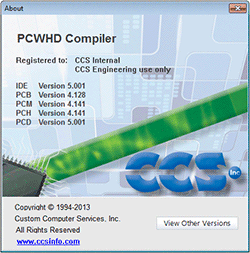
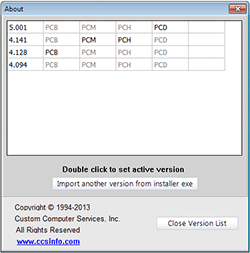
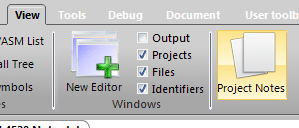
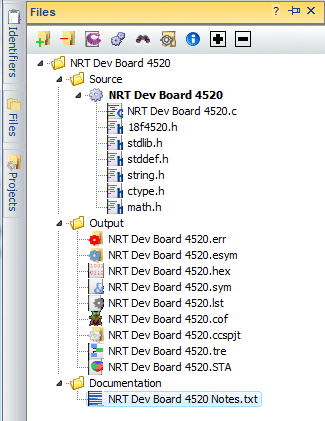
Multiple Compiler Versions Version 5 IDE now supports previous versions of compiler allowing you to choose amongst legacy versions to use. This feature provides for standardization on a specific version based on projects, testing or certifications. Project Notes Now, with each project, you'll be able to create a "Project Notes" file. This file allows you to create notes pertaining to each project. Each of these files can be associated to a particular project via the menu or Files navigation pane. 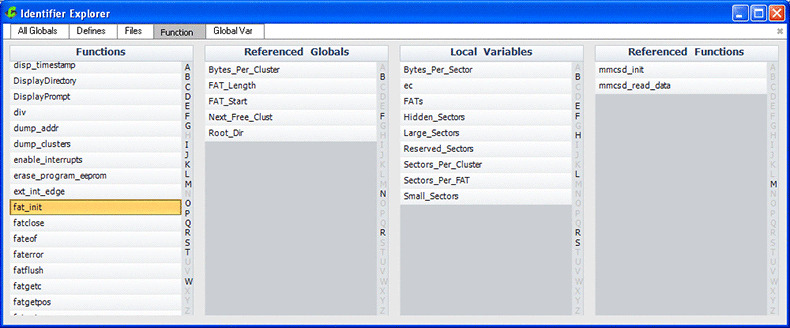
Identifier Explorer The new "Identifier Explorer" in Version 5 IDE allows for a quick and easy way to view the relationship between program identifiers. For example; which variables and functions are declared in each file, or to see all functions that access a global variable. This screen shot shows for a single function all global variables accessed, as well as, local variables and functions called.
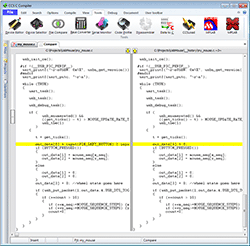
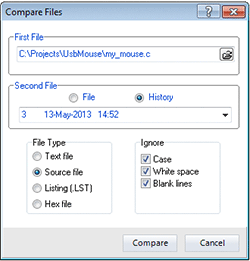
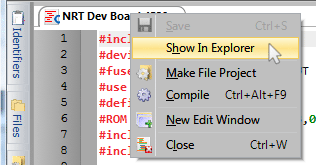
Files navigation panel The style and functionality of the "Files Navigation Panel" has been improved and simplified. For example; it is much easier to add units, for linking, or to add other C and H files in single compilation unit projects. Project History Version 5 now automatically maintains a history of source code changes. The IDE can be configured to specify how often and how many old files to be saved (maintain old file on every save, once an hour, once a day, etc). The File Compare utility inside the IDE also keeps this history and allows you to compare a current file to an older file from history. Show in Explorer The right-click 'Show in Explorer' is now available on the editor tabs. This allows you to open an explorer window at the destination of the file.
Version 5 is set to launch next week! We invite you to visit www.ccsinfo.com/version5 for more information. Also be sure to stay tuned for upgrade specials and promotional offers.
Follow us on Facebook and Twitter
Yours sincerely,
CCS, Inc. | May 13, 2013 Expand to read article below CCS, Inc. CCSC Version 5 beta testing is underway and we are receiving exemplary reviews from our testers. Due to successful testing we are set to launch Version 5 on the week of May 20th, 2013! CCS would like to thank the hundreds of loyal customers who have agreed to beta testing Version 5. This large response has helped make Version 5 a solid development tool. At this point we would like to provide you with a sneak peek into some of these improvements.
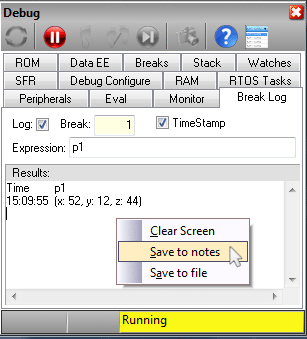
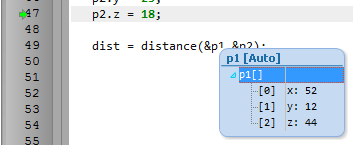
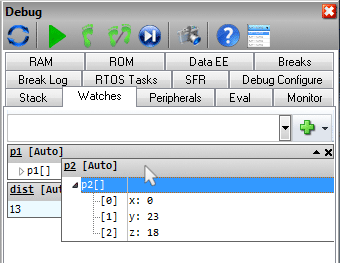
Save to notes The option to "Save to notes" has been added to the right-click menu of multiple debug windows which will append the selected data (such as break log or RAM data) to the end of the notes file associated to the project. Mouse-over Watch Hovering over any structure or array variable while debugging will now allow you to expand or collapse a pop-up note in the "watch window". Drag and drop "watch items". Have an important watch variable that is in the middle or at the bottom of your watch list? You can now drag and drop watch items within the watch window to reorder them by your preference.
Be on the watch, later this week, for part two of the sneak peek! Version 5 is set to launch on the week of May 20th, 2013!
Just a reminder: May 16th is the last day to enroll for beta testing. To participate in beta testing and for more information on Version 5 we invite you to visit www.ccsinfo.com/version5. Also be sure to stay tuned for upgrade specials and promotional offers.
Follow us on Facebook and Twitter
Yours sincerely,
CCS, Inc. | March 25, 2013 Expand to read article below CCS has been hard at work improving our IDE Compiler. We can barely hold back our excitement to show our users the enhancements we have made to our IDE compiler to improve their projects. Many aspects of the IDE have been polished to give the IDE a more sleek and modern look and to provide more powerful tools for our users.
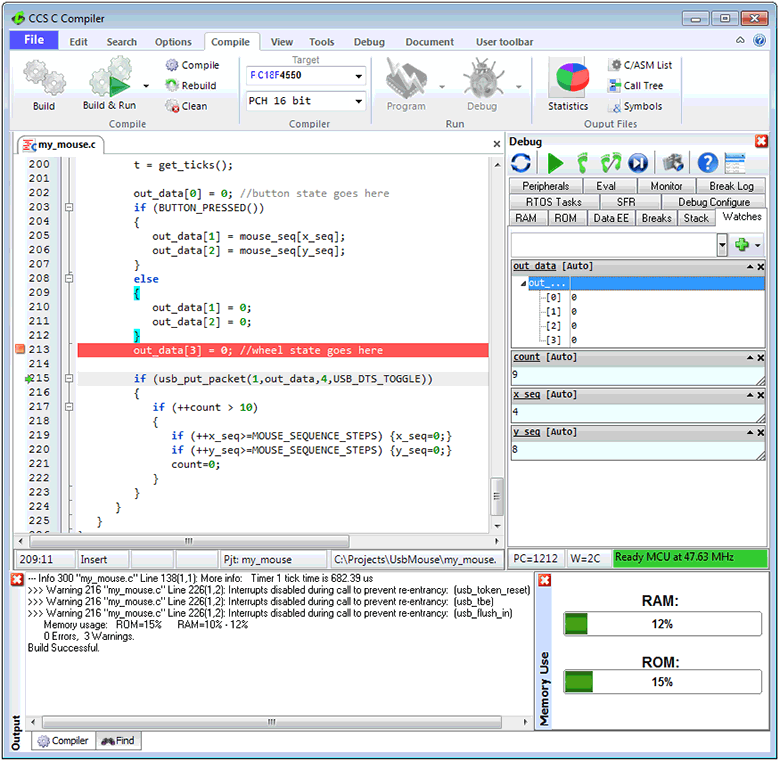
The Superbar has been slightly re-arranged to emphasize more commonly used items. Our C editor has been updated with instant syntax checking, column editing, smart highlighting and searching with regular expressions. Debugger improvements make it easier to watch complicated variables like arrays and structs.
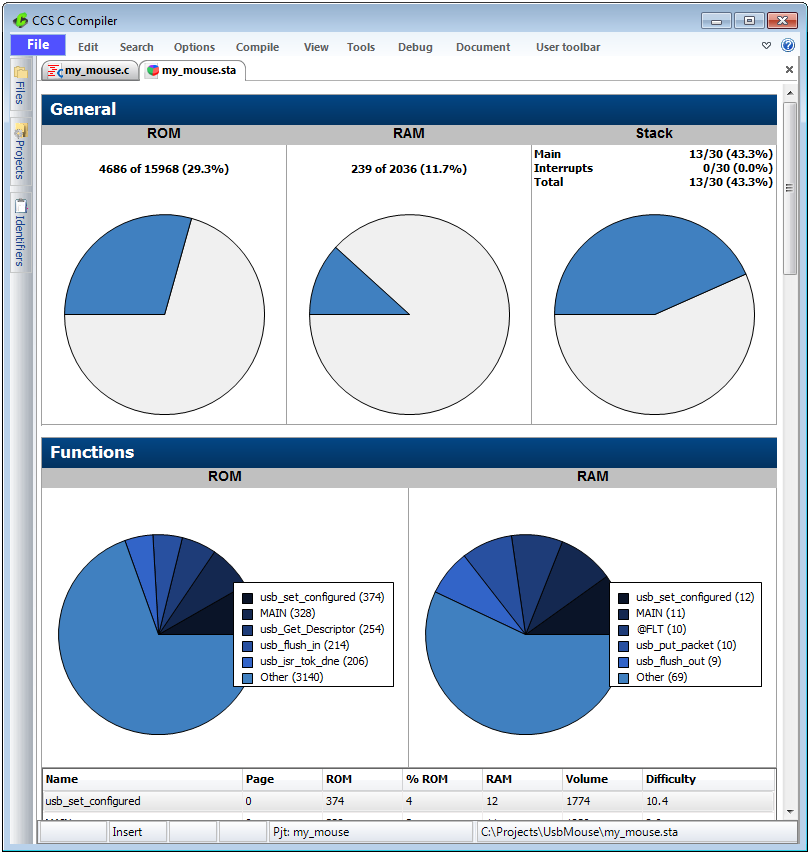
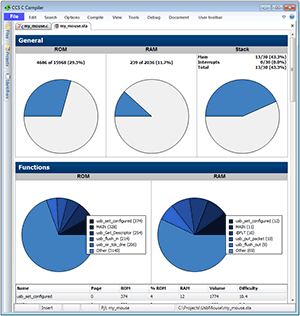 The convenient Statistic viewer graphically displays the percentage amount of program memory, data memory and stack space. The Functions section graphically shows which functions use the most program memory or data memory in a pie chart. This is very useful for quickly determining which functions the user might need to review if the user is looking for ways to optimize the program to use less memory.
The revamped Tree viewer shows the call tree graphically. Each function of the call tree is represented by a block. Now the user can drag-and-drop the placement of the blocks. It is also possible to hide branches of the call tree and only inspect the calls out of one function.
The Editor now has a live syntax checker. Any code errors that would prevent the project from compiling will be displayed with a red-underline under the offending syntax. This check is done live while you are typing. To view the syntax error, simply hover the mouse over the underling.
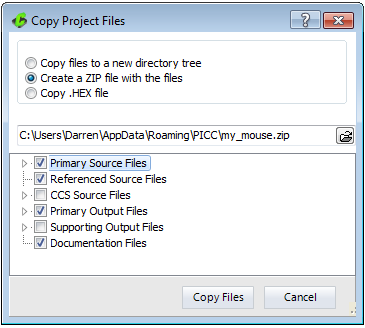
Use our Copy project tool to copy all relevant files in your project to a new directory or ZIP file.
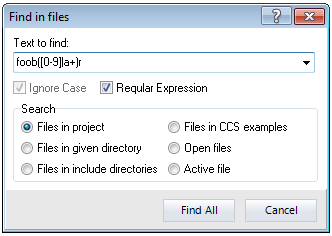
The sharpened Find and Search tool can now use regular expressions. Regular expressions allow the user to enter complex parameters into the search field for matching specific combinations of characters, digits or phrases. In the example screenshot, foob([0-9]|a+)r is entered which would find 'foob0r', 'foob1r', 'foobar', 'foobaar', etc.
The Editor has an improved 'Find all References' and 'Find Delcaration' tool. These unique new tools can be selected by right clicking on an identifier in the editor. 'Find All References' finds all the references of this identifier, while intelligently skipping over any commented references or similar identifiers that don't match because of overloading. 'Find Declaration' will find the location where the identifier was declared.
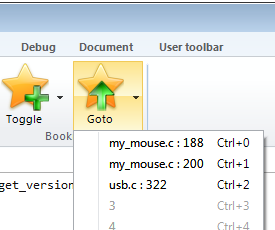
The advanced Bookmark tool is now project specific and spans all files in the project. The menu will also show you the locations where bookmarks were set.
Our Compile menu now has a new 'Build and Run' tool that will compile the program and program it to the microcontroller with one simple mouse click.
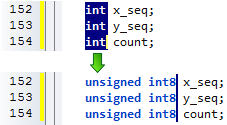
The Editor tool also has a column editing feature. This is useful if there are several lines that start or contain the same block of text but need to be replaced or edited. To use this feature, press the CTRL key on the keyboard while using the left mouse button on the mouse to select a block of text. Pressing DEL will delete that block of text, or typing will replace block of text with new text.
Find out for yourself how the new IDE enhancements can strengthen your productivity and get you ahead of the curve on your product development.
Take a look at the Version 5 page for additional features that will be in Version 5.
Keep your eyes peeled for V5 upgrade specials and deals.
Visit ccsinfo.com/enhance to purchase our feature rich IDE Compiler, Maintenance or Upgrade.
Follow us on Facebook and Twitter | November 2, 2012 Expand to read article below Why should you try the C++ Stream I/O operator support in the CCS Compiler? As you know, in standard C, basic I/O are handled by functions like getc(), putc() and printf() and the formatting of data is handled by functions like atoi(), atof(), strotul() and sprintf(). For example, reading a floating point number from the user over RS232 would require a combination of gets() followed by atof(). While CCS includes an input.c library that accomplishes many of these tasks, the input.c library uses a fixed RS232 stream and does not work with Keypad/LCD or USB without modification. Introducting in Version 5 of the CCS C Compiler, there is added support for the C++ stream operator. C++ streams provided a unified interface for I/O and data formatting.
The two new opreators added are the extraction operator and the insertion operator:
| Operator Symbol | Operator Name |
| >> | Extraction |
| << | Insertion |
When used, these operators show the direction of data. For example:
| Example | Comment |
| x>>y | Data read/parsed from x and saved/sent to y |
| x<<y | Data read/parsed from y and saved/sent to x |
The beauty of these operators is that the x and y in the above examples can be any combination of function, RS232 serial stream, variable, string and more.
One of the key features of this new feature in the CCS C Compiler is the way it automatically handles the conversion based upon the data types of the variables passed. These conversions are done automatically, no other helper functions like atof() need to be called. For example, if a variable is of float type the compiler will properly convert it from string to float on an input or convert float to string on an output.
Read all the additional details on output and see examples of C++ Streaming by clicking through to: Version 5
A few examples: | cout << fvar << endl; | // Display a floating point variable |
| cin >> fvar; | // Read in a float |
| lcd_putc << "count=" << count; | // send to LCD |
| string1 >> fvar; | // string to float conversion |
Additional configurations and control options will also be available in Version 5. Feel free to contact us with any comments or questions about the serial library upgrades.....
Want to be a beta tester* for Version 5.... or make suggestions on what you would like to see in Version 5....click thru to the above link!
*All customers with active maintenance are eligible to apply for V.5 betas.
All customers with active maintenance when V.5 is released will receive V.5 at no additional cost.
Resources
To learn more about CCS's C Compiler, visit: Our Compiler Page
To see more helpful hints and tips, visit: Our FAQ Page or Our Customer Forum
Follow us on Facebook and Twitter | October 24, 2012 Expand to read article below CCS has added new #use capture() and #use pwm() libraries that makes it easier to use the PIC® MCU capture/compare/PWM, input capture and output capture peripherals. There are sometimes challenges in using these peripherals when designing the PWM to operate at a desired frequency and resolution, or configuring the capture peripheral to measure events at a known time duration. Another challenge is that the configuration is generally only valid for certain PIC families and one oscillator speed; changing the PIC® or the oscillator would mean reviewing and updating the way those peripherals are configured.
CCS’s new #use capture() and #use pwm() libraries solve these problems by making it easy to use these peripherals and making the code portable to different PIC® MCUs and oscillator speeds.
- #use capture() is when the input capture peripheral samples and holds a timer value when the peripheral’s input pin reaches the desired level. This peripheral is useful for measuring the time duration between two events.
- #use pwm() is for Pulse-width modulation (PWM), the method of pulsing a digital signal on/off to represent an analog signal. A PWM's two properties are its frequency and duty cycle. A duty cycle is the ratio the digital signal is on versus off.
See examples of these libraries with further details by clicking through to: Version 5
Additional configurations and control options will also be available in Version 5. Feel free to contact us with any comments or questions about the serial library upgrades.....
Want to be a beta tester* for Version 5.... or make suggestions on what you would like to see in Version 5....click thru to the above link!
*All customers with active maintenance are eligible to apply for V.5 betas.
All customers with active maintenance when V.5 is released will receive V.5 at no additional cost.
Resources
To learn more about CCS's C Compiler, visit: Our Compiler Page
To see more helpful hints and tips, visit: Our FAQ Page or Our Customer Forum
Follow us on Facebook and Twitter | October 8, 2012 Expand to read article below The next new item to try when Version 5 Beta is released, is the powerful #use rs232() library that has added transmit buffering, receive buffering, and flow control. While the API for the serial library remains unchanged ( getc(), putc(), printf() ), existing code using this API allows for buffering and flow control by simply modifying the #use rs232() parameters. A user may specify:
- size of transmit buffer
- size of receive buffer
- interrupt usage or no interrupt usage
- pin for CTS and pin for RTS
Click through to: Version 5
to review a usage example of the #use rs232() and additional details on each new usage. Additional configurations and control options will also be available in Version 5. Feel free to contact us with any comments or questions about the serial library upgrades.....
Want to be a beta tester* for Version 5.... or make suggestions on what you would like to see in Version 5....click thru to the above link!
*All customers with active maintenance are eligible to apply for V.5 betas.
All customers with active maintenance when V.5 is released will receive V.5 at no additional cost.
Resources
To learn more about CCS's C Compiler, visit: Our Compiler Page
To see more helpful hints and tips, visit: Our FAQ Page or Our Customer Forum
Follow us on Facebook and Twitter | September 27, 2012 Expand to read article below Just when you thought the CCS C Compiler could not get any better, you thought wrong! CCS will launch Version 5 for beta in the upcoming one to two months. During the beta testing period, new features will be continuously announced and rolled out in new beta versions.
One brand new and exciting feature newly added for Version 5 is the C Profiler. While the PIC® MCU is running, information about the program that is executing, is continuously logged and analyzed to give a profile of the program.
You can easily obtain information while using the C Profiler and ICD-U64, such as:
- Profile only certain blocks of code
- Transmit special debug messages
- Log certain variables
There is quite a bit more to the C Profiler than a news announcement can do justice, as well as the many more additions to Version 5....keep looking for additional news stories, as well as updates to the Version 5 page on our website.
Version 5
Want to be a beta tester* for Version 5.... or make suggestions on what you would like to see in Version 5....click thru to the above link!
*All customers with active maintenance are eligible to apply for V.5 betas.
All customers with active maintenance when V.5 is released will receive V.5 at no additional cost.
Resources
To learn more about CCS's C Compiler, visit: Our Compiler Page
To see more helpful hints and tips, visit: Our FAQ Page or Our Customer Forum
Follow us on Facebook and Twitter | July 23, 2012 Expand to read article below There can never be enough built-in functions in a programmers library. CCS has once again added new libraries like #use timer(), #use delay(), and #use touchpad() that wil save you valuable time and space.
The new #use timer() library makes it easy to set-up a tick timer in your project. The library allows for setting up both an interrupt driven and non-interrupt driven tick timer.
The #use delay() library has new options added for configuring PIC devices with a USB peripheral. When using this function for the new USB options, the #use delay() library will set-up all necessary configuration and oscillator settings for the device to use the USB peripheral.
Updates have been made to the #use touchpad() library to support devices with a Charge Time Measurement Unit (CTMU) peripheral. Use this in addition to the already supported Capacitive Sensing Module (CSM) peripheral.
Resources
To learn more about CCS's C Compiler, visit: Our Compiler Page
To see more helpful hints and tips, visit: Our FAQ Page or Our Customer Forum
Follow us on Facebook and Twitter | July 23, 2012 Expand to read article below Many of the new devices from Microchip include new peripheral support. The question you ask yourself, "How do I use these peripherals?"
CCS has answered that question by adding new Built-in Functions to the compiler. Version 4.135 of the compiler now include support for Configurable Logic Cell (CLC), Pulse-Width Modulation (PWM), Complementary Waveform Generator (CWG), Numerically Controlled Oscillator (NCO) and Data Signal Modulator (DSM).
Download a new version or update your compiler today!
Resources
To learn more about CCS's C Compiler, visit: Our Compiler Page
To see more helpful hints and tips, visit: Our FAQ Page or Our Customer Forum
Follow us on Facebook and Twitter | June 19, 2012 Expand to read article below Are you having compatibility issues with your CCS C Compiler and your computer? CCS can help you pinpoint where the issue is and give you solutions!
Although the CCS C Compiler (v4.100 and newer) is fully compatible with newer operating systems, exercise caution during installation. We recommend use of the install program to install the compiler while logged on as an administrator. We also suggest that you DO NOT copy-paste files from one installation to another, as these operating systems recognize installation programs and create paths for proper installation.
Use the Windows drag and drop to copy new registration files to the PICC directory. Email and other file management programs may cause the operating system to create a shadow copy of the file, rather than copying the file to the requested location. To ensure the files are where you want them, verify the following directory is empty:
%LOCALAPPDATA%virtualstoreprogram files (x86)PICC
**(x86) may or may not be in your directory name**
This directory must always be empty for the CCS C Compiler to perform correctly, as the compiler and all of CCS's development tools are tagged as being Windows 7 class programs. Keep all sources and include files in a directory under C:USERS. The installation program will create a project directory for you in a safe location on the PC.
Resources
To learn more about CCS's C Compiler, visit Our Compiler Page
To see more helpful hints and tips, visit Our Forum and Our FAQ page
Follow us on Facebook and Twitter |
|